Property buyers and renters already close details on WhatsApp. Your project or brokerage site still sends “contact us” emails that land after the evening walkthroughs are booked. This guide shows how to build a real estate lead form that notifies on WhatsApp: budget, locality, and intent fields in one HTML form, no CRM middleware on day one, and no backend on the marketing site.
You are not replacing a full CRM. You are capturing a site-visit or callback request with enough structure that an agent can reply in one tap while the buyer is still comparing listings.
What you’ll need
- A project microsite, brokerage site, or landing page where you can paste HTML (or set a custom form action)
- A free FormsReach API key
No PHP mailer, no “Zapier only works if the builder plugin is happy,” no serverless function per campaign.
Why “Call me” and bare contact forms lose site visits
Speed matters when two agents chase the same lead. Unstructured capture slows everyone down:
| Capture method | Typical failure |
|---|---|
| Phone number only | No budget, no locality, cold callback |
wa.me button |
Desktop friction; “Hi” with zero listing context |
| Generic contact form | Free-text message, no budget band or BHK |
| Email-only notify | Opens after the evening site visits are full |
A lead form that forces budget and locality (and still notifies on WhatsApp) gives agents a filter before they dial. For when click-to-chat is enough versus when you need structured fields, see WhatsApp click-to-chat vs contact form. The general form-to-WhatsApp setup is in the pillar guide: send website form submissions to WhatsApp.
Field schema for a site-visit lead form
Stable name attributes matter more than pretty labels. WhatsApp and the dashboard show the keys you POST.
Field name |
Type | Required | Why |
|---|---|---|---|
name |
text | yes | Buyer / renter name |
phone |
tel | yes | Primary reach channel |
email |
optional | Brochures and follow-up packs | |
intent |
select | yes | Buy / rent / invest / site-visit |
locality |
text or select | yes | Area or project interest |
budget |
select | yes | Band agents can filter on |
property_type |
select | optional | Apartment, villa, plot, commercial |
bhk |
select | optional | Configuration filter |
preferred_date |
date | optional | Site-visit window |
message |
textarea | optional | Timeline or loan status |
api_key |
hidden | yes | FormsReach account routing |
Tune budget and locality options to the market you sell in. Keep values short for chat readability ("50-75L", "whitefield", "2bhk").
Step 1: Copy the HTML lead form
Use the FormsReach submit endpoint and a hidden API key. Style with your landing-page CSS; the snippet is the data contract.
<form action="https://api.formsreach.com/submit" method="POST">
  <input type="hidden" name="api_key" value="YOUR_API_KEY" />

  <label>
    Full name
    <input type="text" name="name" required autocomplete="name" />
  </label>

  <label>
    Phone (WhatsApp)
    <input type="tel" name="phone" required autocomplete="tel" />
  </label>

  <label>
    Email
    <input type="email" name="email" autocomplete="email" />
  </label>

  <label>
    I want to
    <select name="intent" required>
      <option value="">Select</option>
      <option value="buy">Buy</option>
      <option value="rent">Rent</option>
      <option value="invest">Invest</option>
      <option value="site-visit">Book a site visit</option>
    </select>
  </label>

  <label>
    Locality / project
    <input
      type="text"
      name="locality"
      required
      placeholder="e.g. Whitefield, or project name"
    />
  </label>

  <label>
    Budget
    <select name="budget" required>
      <option value="">Select a range</option>
      <option value="under-50L">Under 50L</option>
      <option value="50-75L">50L - 75L</option>
      <option value="75L-1Cr">75L - 1Cr</option>
      <option value="1-2Cr">1Cr - 2Cr</option>
      <option value="2Cr-plus">2Cr+</option>
      <option value="rent-under-30k">Rent under 30k / mo</option>
      <option value="rent-30-60k">Rent 30k - 60k / mo</option>
    </select>
  </label>

  <label>
    Property type
    <select name="property_type">
      <option value="apartment">Apartment</option>
      <option value="villa">Villa / independent</option>
      <option value="plot">Plot</option>
      <option value="commercial">Commercial</option>
    </select>
  </label>

  <label>
    Configuration
    <select name="bhk">
      <option value="">Any</option>
      <option value="1bhk">1 BHK</option>
      <option value="2bhk">2 BHK</option>
      <option value="3bhk">3 BHK</option>
      <option value="4bhk-plus">4 BHK+</option>
    </select>
  </label>

  <label>
    Preferred site-visit date
    <input type="date" name="preferred_date" />
  </label>

  <label>
    Notes
    <textarea
      name="message"
      rows="3"
      placeholder="Timeline, loan pre-approval, parking needs…"
    ></textarea>
  </label>

  <button type="submit">Request a callback</button>
</form>
Replace YOUR_API_KEY with your dashboard key. Do not change the endpoint (https://api.formsreach.com/submit) or the hidden field name (api_key).
This works on static hosts and most builders the same way: browser POST, external API, site stays static. Details: contact form on a static website without a backend.
Step 2: Optional JS SDK for landing pages
Paid traffic landing pages often want stay-on-page success states. Use @formsreach/js:
<script src="https://unpkg.com/@formsreach/js/dist/formsreach.min.js"></script>
<script>
  FormsReach.init({ apiKey: 'YOUR_API_KEY' });
</script>

<form data-formsreach>
  <input type="text" name="name" required />
  <input type="tel" name="phone" required />
  <select name="intent" required>
    <option value="">I want to</option>
    <option value="buy">Buy</option>
    <option value="rent">Rent</option>
    <option value="site-visit">Site visit</option>
  </select>
  <input type="text" name="locality" required />
  <select name="budget" required>
    <option value="">Budget</option>
    <option value="50-75L">50L - 75L</option>
    <option value="75L-1Cr">75L - 1Cr</option>
    <option value="1-2Cr">1Cr - 2Cr</option>
  </select>
  <textarea name="message" rows="3"></textarea>
  <button type="submit">Request a callback</button>
</form>
Keep the same field names as the HTML version so WhatsApp templates of the message stay consistent across campaigns.
Step 3: Route notifications to the right agents
Email first: Free and Starter meter email (and free webhooks / workflow rules) from monthly credits. Free includes 500 credits per month (typically 1 credit per accepted submission + 1 per email).
WhatsApp on Pro and Agency: verify each agent number with OTP. You can attach multiple numbers per form (up to the plan limit) so site-visit leads hit the floor team, not a shared inbox nobody owns.
Practical routing tips:
- One FormsReach form per major project or city cluster if different teams own different inventories.
- Use a webhook (0 credits) into your sheet or CRM if ops already lives there; keep WhatsApp as the “reply now” channel.
- Test on the production domain after allowlisting it.
You do not need WhatsApp enabled to prove the form works. Turn chat on when agents ignore email.
What a good WhatsApp lead looks like
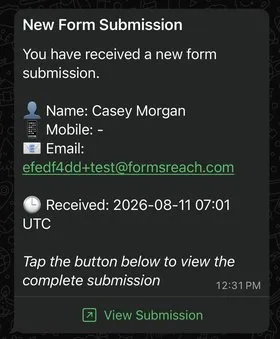
Same form API; extra keys appear like any other field. Useful when two campaigns share one project page.
Step 4: Smoke-test before spend goes live
- Submit as a fake buyer with a phone you control.
- Confirm every custom field in the FormsReach dashboard.
- Confirm email / WhatsApp content is readable on a phone screen (long budget labels wrap badly; keep values short).
- Block empty required fields in the browser; confirm spammy submissions are filtered without a CAPTCHA wall that kills conversion.
- Retest after the ad URL gets UTM parameters.
Troubleshooting
Agents say WhatsApp never fired
Plan must include WhatsApp (Pro/Agency), number OTP-verified, credits remaining for a WhatsApp send. Form acceptance and channel delivery are separate credit events.
Budget or locality missing in chat
Inspect the live HTML for name="budget" and name="locality". Builders sometimes rename fields to internal IDs.
Works on preview URL, fails on custom domain
Allowlist both hosts. Confirm production still has the hidden api_key after the builder publish step.
CORS errors after switching to fetch
Prefer classic form POST or the official FormsReach.init + data-formsreach path instead of hand-rolled fetch to the API.
Need the same recipe for clinic appointments
Different fields, same endpoint: clinic appointment form to WhatsApp.
Ship real estate leads without bolting on a CRM first
A real estate lead form that notifies on WhatsApp is structured fields (budget, locality, intent), a POST to https://api.formsreach.com/submit, and channel settings in a form API. FormsReach gives you that endpoint, spam filtering without CAPTCHA, email on Free (500 credits/month), free webhooks, and WhatsApp on Pro and Agency via Meta’s Business API. No backend on the project site, no plugin maze for a campaign that should have gone live yesterday.